





back to : how to search in the store
Searching for Products by Filters
To help you quickly find perfectly matched components in our extensive range, we have provided an advanced product filtering. Thanks to it, you will precisely narrow down the search results and instantly reach the sought product without having to browse hundreds of items.
Where Can You Find Filters and How Do They Work?
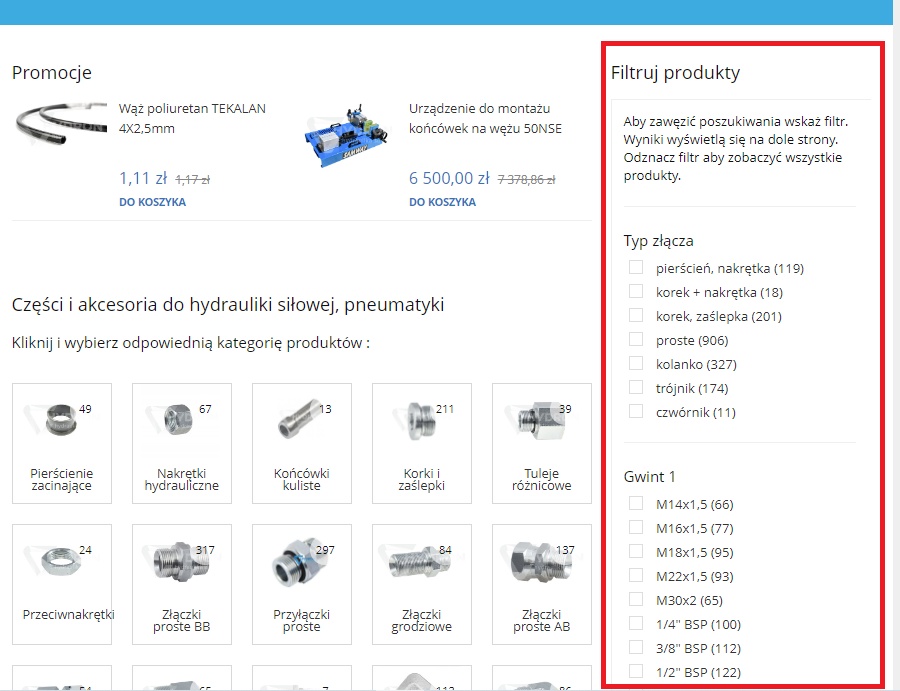
The filtering panel is located on the right side of the screen immediately after entering any product category. It works dynamically – the range of available filters automatically adjusts to the specifics of the selected product group:
- Fittings and connectors: you can filter by type (e.g. straight, elbows, tees, crosses) and thread type and size (e.g. BSP, JIC, metric).
- Hoses and lines: you can arrange by internal diameter, working pressure, bending radius, or material purpose.
- Other product groups: customized in terms of their key technical parameters (e.g. max pressure, temperature, type of seal).
Example: Searching in the Hydraulic Fittings Category
When looking for a specific fastening element, simply open the category Hydraulic Fittings, and then in the filter panel on the right side, select the parameters you are interested in:
- Fitting type: select e.g. Elbow, Tee or Straight fitting.
- Thread: select the specific thread size matching your installation.
Important Tips for Using Filters
To make the most of the filtering possibilities, remember two simple rules:
- Displaying results: After selecting the chosen criteria in the filter panel, scroll down the page – below you will see only those goods that meet all the selected conditions.
- Resetting filters: If you want to return to the full offer view of a given category and see all products, remember to deselect previously selected filters (or click the clear filters button).
Use category filters to save time and be 100% sure of choosing the right technical parameters!
Important ! if we choose ( select a given filter ) you need to scroll down to the bottom of the page, where the selected products will appear. To see all products we must deselect the selected filter again.